Posts

COVID-19 Tracker

Image
 COVID-19  TRACKER Creating covid-19 tracker using COVID-19 API we use the ๐Ÿ‘‰ LINK   to provide many covid -19 API we use in this project ๐Ÿ‘‰ https://disease.sh/v3/covid-19/gov/India . This api provid the INDIA Total cases, new cases for covid-19 this data updated 24 hours. We use languages in this project ๐Ÿ‘‰ HTML, CSS, BOOTSTRAP ,JS Hello guys ๐Ÿ‘‹ Let us start with implementing Your Own COVID-19 tracker. are you excited ๐Ÿ˜‹for create your own covid-19 tracker. First of all open any code editor create a folder ๐Ÿ“ and name it your choice. next create a basic structure of your project . create a following files like๐Ÿ‘‰indix.html, style.css and script.js. Fist of all we introduce the file structure: indix.html๐Ÿ‘‰ All html code writing in this file. style.css๐Ÿ‘‰All CSS code writing in this file. script.js๐Ÿ‘‰All java script code writing in this file.   Next step ๐Ÿ‘‰ open the indix.html file and past the following code: <!DOCTYPE html> <html lang="en...

FRONT END ( Tribal & Farmer Website)

Image
Component's :- Navbar: First of all include all file mention below : Link the Bootstrap (4.0 Version) CDN to the header section of  the html page Other vise download bootstrap ๐Ÿ“‚folder and past it project folder ๐Ÿ“‚ and link the CSS file to most header section and js link to end of the body tag.   Download  here. Link the font awesome  CDN   CDN Link   to the after bootstrap folder link ( help full for icon integration ) Let see exactly code we write code in HTML CSS BOOSTRAP: HTML CODE : <!DOCTYPE html> <html lang="en"> <head>     <meta charset="UTF-8">     <meta http-equiv="X-UA-Compatible" content="IE=edge">     <meta name="viewport" content="width=device-width, initial-scale=1.0">     <title>Product Detaile</title>     <!--Boostrap File Link-->     <link rel="stylesheet" href="bootstrap/dist/css/bootstrap.min.css"/>   ...

Wix Corvid

 Introduction: $w( ): Selects and returns elements from a page. String means Id pass   # Symbol    multiple selectors separated by commas . If two or more selectors select the same element, it's still returned only once in the array. API Properties :- id ,  type ,  show() ,  hide() Example: Select element using Id :  let myElement = $w ( "#myElement" ) ; 2 3 let elementType = myElement . type ; // "$w.Type" Select element using by Type:  let typeElements = $w ( "Type" ) ; 2 3 let firstOfType = typeElements [ 0 ] ; Select all the images on the page: let imageElements = $w ( "Image" ) ; 2 3 let firstImage = imageElements [ 0 ] ; Select element using multiple selector:  let selected = $w ( "#myElement1, #myElement3, Type" ) ; Select all the page image hide: $w ( "Image" ) . hide ( ) ; Syntax:             function $w ( selector : string ) : Element | Array < Element >   ...

Switching Tab in wix

Image
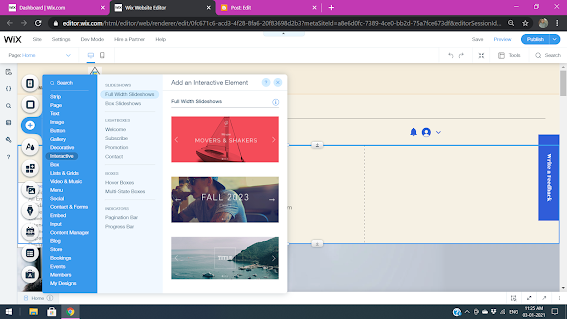
Multi State Boxes STEPS:- 1) First of all please on development mode in wix. 2) Click the + ( add) icon. 3) Select and click interactive 4) And select and drag and drop Boxes -> Multi state boxes. 6) And manage and rename state boxes like repeater  7) Add the code -> open code corvid  terminal and past the following code and changes the accordingly  8) code => $w.onReady( function  () {                 $w( '# add button id' ).onClick(() => {         $w( '# add state box id' ).changeState( " add box name edited " );     });       $w( '# next button id ' ).onClick(() => {         $w( '# add state box id ' ).changeState( " add box name " );     }); });