Todo App (React ) Step 1: First create a project using create project comments -->create-react-app project_name Step 2: Next Open the live Server Means NPM servers -->npm start Step 3: Open your editors (ex: VS code)-->code . Step 3: Create a Firebase Project REfer Firebase Documentation Step 4: Delete the Unuse Files Step 5: Code For App.js:- import React , { useState , useEffect } from 'react' ; import Todo from './Todo' ; import { Button , FormControl , Input , InputLabel } from '@material-ui/core' ; import './App.css' ; import db from './firebase' ; import firebase from 'firebase' ; function App () { const [ todos , setTodos ] = useState ([]); const [ input , setInput ] = useState ( ''...
Bootstrap Introduction:- Get started with Bootstrap, the world’s most popular framework for building responsive, mobile-first sites. How To Accesses Bootstrap? First Link The Bootstrap CDN in HTML file in the header section. Like CSS CDN :- <link rel= "stylesheet" href= "https://stackpath.bootstrapcdn.com/bootstrap/4.5.2/css/bootstrap.min.css" integrity= "sha384-JcKb8q3iqJ61gNV9KGb8thSsNjpSL0n8PARn9HuZOnIxN0hoP+VmmDGMN5t9UJ0Z" crossorigin= "anonymous" > <script src= "https://stackpath.bootstrapcdn.com/bootstrap/4.5.2/js/bootstrap.min.js" integrity= "sha384-B4gt1jrGC7Jh4AgTPSdUtOBvfO8shuf57BaghqFfPlYxofvL8/KUEfYiJOMMV+rV" cros...
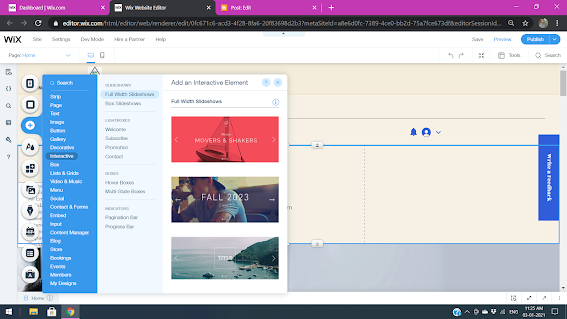
Multi State Boxes STEPS:- 1) First of all please on development mode in wix. 2) Click the + ( add) icon. 3) Select and click interactive 4) And select and drag and drop Boxes -> Multi state boxes. 6) And manage and rename state boxes like repeater 7) Add the code -> open code corvid terminal and past the following code and changes the accordingly 8) code => $w.onReady( function () { $w( '# add button id' ).onClick(() => { $w( '# add state box id' ).changeState( " add box name edited " ); }); $w( '# next button id ' ).onClick(() => { $w( '# add state box id ' ).changeState( " add box name " ); }); });

Comments
Post a Comment